Chapter 2
File Formats
There are several standard 3D file formats. Here’s an overview of what each one offers:
• .obj: This format, developed by Wavefront Technologies, has been around for awhile, and almost every 3D app supports importing and exporting .obj files. You can specify materials (textures and surface properties) using an accompanying .mtl file, however, this format does not support animation or vertex colors.
• .glTF: Developed by Khronos — who oversee Vulkan and OpenGL — this format is relatively new and is still under active development. It has strong community support because of its flexibility. It supports animated models.
• .blend: This is the native Blender file format. Metal by Tutorials Chapter 2: 3D Models raywenderlich.com 50• .fbx: A proprietary format owned by Autodesk. This is a commonly used format that supports animation but is losing favor because it’s proprietary and doesn’t have a single standard.
• .usd: A scalable open source format introduced by Pixar. USD can reference many models and files, which is not ideal for sharing assets. .usdz is a USD archive file that contains everything needed for the model or scene. Apple uses the USDZ format for their AR models.
Note: You can use Apple’s Reality Converter to convert 3D files to USDZ.
Apple also provides tools for validating and inspecting USDZ files (https://
apple.co/3gykNcI), as well as a gallery of sample USDZ files (https://apple.co/
3iJzMBW).
OBJ
.obj
# Apple ModelIO OBJ File: plane
mtllib plane.mtl
g submesh
v 0 0.5 -0.5
v 0 -0.5 -0.5
v 0 -0.5 0.5
v 0 0.5 0.5
vn -1 0 0
vt 1 0
vt 0 0
vt 0 1
vt 1 1
usemtl material_1
f 1/1/1 2/2/1 3/3/1
f 1/1/1 3/3/1 4/4/1
s off
Here’s the breakdown:
• mtllib: This is the name of the accompanying .mtl file. This file holds the material details and texture file names for the model.
• g: Starts a group of vertices.
• v: Vertex. For the cone, you’ll have 102 of these.
• vn: Surface normal. This is a vector that points orthogonally — that’s directly outwards. You’ll read more about normals later.
• vt: uv coordinate that determines the vertex’s position on a 2D texture. Textures use uv coordinates rather than xy coordinates.
• usemtl: The name of a material providing the surface information — such as color — for the following faces. This material is defined in the accompanying .mtl file.
• f: Defines faces. You can see here that the plane has two faces, and each face has three elements consisting of a vertex/texture/normal index. In this example, the last face listed: 4/4/1 would be the fourth vertex element / the fourth texture element / the first normal element: 0 0.5 0.5 / 1 1 / -1 0 0.
• s: Smoothing, currently off, means there are no groups that will form a smooth surface.
.mtl
# Apple ModelI/O MTL File: primitive.mtl
newmtl material_1
Kd 1 1 1
Ka 0 0 0
Ks 0
ao 0
subsurface 0
metallic 0
specularTint 0
roughness 0.9
anisotropicRotation 0
sheen 0.05
sheenTint 0
clearCoat 0
clearCoatGloss 0
Here’s the breakdown:
• newmtl material_1: This is the group that contains all of the cone’s vertices.
• Kd: The diffuse color of the surface. In this case, 1 1 1 will color the object white.
• Ka: The ambient color. This models the ambient lighting in the room.
• Ks: The specular color. The specular color is the color reflected from a highlight.
APIs
-
export models from Metal
// begin export code // 1 let asset = MDLAsset() asset.add(mdlMesh) // 2 let fileExtension = "obj" guard MDLAsset.canExportFileExtension(fileExtension) else { fatalError("Can't export a .\(fileExtension) format") } // 3 do { let url = playgroundSharedDataDirectory.appendingPathComponent("primitive.\(fileExtension)") try asset.export(to: url) } catch { fatalError("Error \(error.localizedDescription)") } // end export code -
Vertex Descriptor
// 1
let vertexDescriptor = MTLVertexDescriptor()
// 2
vertexDescriptor.attributes[0].format = .float3
// 3
vertexDescriptor.attributes[0].offset = 0
// 4
vertexDescriptor.attributes[0].bufferIndex = 0

// 1
vertexDescriptor.layouts[0].stride = MemoryLayout<SIMD3<Float>>.stride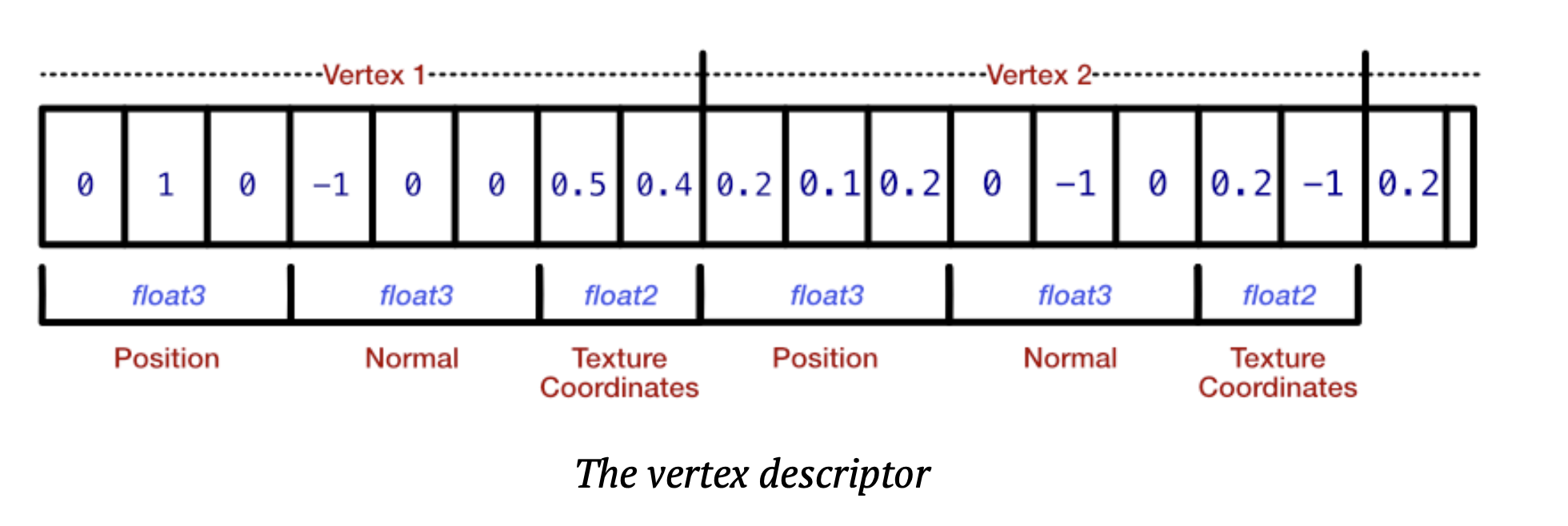
-
Load model in Metal
// 2
let meshDescriptor = MTKModelIOVertexDescriptorFromMetal(vertexDescriptor)
// 3
(meshDescriptor.attributes[0] as! MDLVertexAttribute).name = MDLVertexAttributePosition

let asset = MDLAsset(
    url: assetURL,
    vertexDescriptor: meshDescriptor,
    bufferAllocator: allocator)
let mdlMesh = asset.childObjects(of: MDLMesh.self).first as! MDLMesh