Chapter 1 Hello Metal
Metal Pipeline
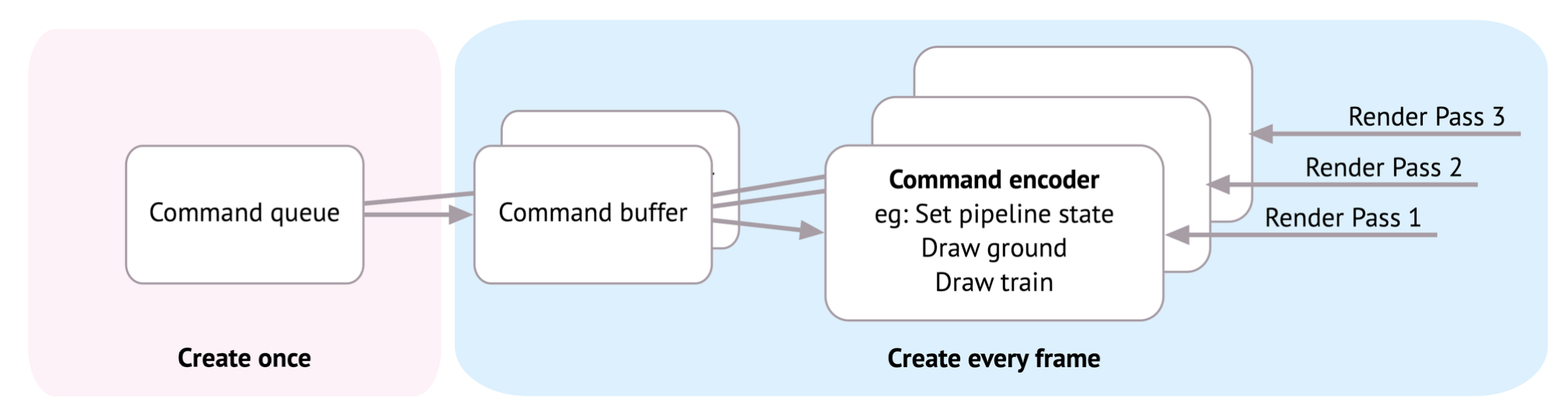
Command Queue / Buffer / Encoder
guard let commandQueue = device.makeCommandQueue() else {
    fatalError("Could not create a command queue")
}
On each frame, you’ll create a command buffer and at least one render command encoder. These are lightweight objects that point to other objects, such as shader functions and pipeline states, that you set up only once at the start of the app.
Model
Model I/O is a framework that integrates with Metal and SceneKit. Its main purpose is to load 3D models that were created in apps like Blender or Maya, and to set up data buffers for easier rendering. Instead of loading a 3D model, you’re going to load a Model I/O basic 3D shape, also called a primitive. A primitive is typically considered a cube, a sphere, a cylinder or a torus.
// 1
let allocator = MTKMeshBufferAllocator(device: device)
// 2
let mdlMesh = MDLMesh(sphereWithExtent: [0.75, 0.75, 0.75],
segments: [100, 100],
inwardNormals: false,
geometryType: .triangles,
allocator: allocator)
// 3
let mesh = try MTKMesh(mesh: mdlMesh, device: device)
Going through the code:
-
The allocator manages the memory for the mesh data.
-
Model I/O creates a sphere with the specified size and returns an MDLMesh with all the vertex information in data buffers.
-
For Metal to be able to use the mesh, you convert it from a Model I/O mesh to a MetalKit mesh.
SubMesh
The mesh is made up of submeshes. When artists create 3D models, they design them with different material groups. These translate to submeshes. For example, if you were rendering a car object, you might have a shiny car body and rubber tires.
One material is shiny paint and another is rubber. On import, Model I/O creates two different submeshes that index to the correct vertices for that group. One vertex can be rendered multiple times by different submeshes. This sphere only has one submesh, so you’ll use only one.
guard let submesh = mesh.submeshes.first else {
    fatalError()
}
Shader
To set up a Metal library containing these two functions, add the following:
let library = try device.makeLibrary(source: shader, options:
nil)
let vertexFunction = library.makeFunction(name: "vertex_main")
let fragmentFunction = library.makeFunction(name:
"fragment_main")
Pipeline State
In Metal, you set up a pipeline state for the GPU. By setting up this state, you’re telling the GPU that nothing will change until the state changes. With the GPU in a fixed state, it can run more efficiently. The pipeline state contains all sorts of information that the GPU needs, such as which pixel format it should use and whether it should render with depth. The pipeline state also holds the vertex and fragment functions that you just created.
However, you don’t create a pipeline state directly, rather you create it through a descriptor. This descriptor holds everything the pipeline needs to know, and you only change the necessary properties for your particular rendering situation.
let pipelineDescriptor = MTLRenderPipelineDescriptor()
pipelineDescriptor.colorAttachments[0].pixelFormat = .bgra8Unorm
pipelineDescriptor.vertexFunction = vertexFunction
pipelineDescriptor.fragmentFunction = fragmentFunction
You’ll describe to the GPU how the vertices are laid out in memory using a vertex descriptor. Model I/O automatically creates a vertex descriptor when it loads the sphere mesh, so you can just use that one.
pipelineDescriptor.vertexDescriptor =
MTKMetalVertexDescriptorFromModelIO(mesh.vertexDescriptor)
let pipelineState = try device.makeRenderPipelineState(descriptor:
pipelineDescriptor)This code creates the pipeline state from the descriptor. Creating a pipeline state takes valuable processing time, so all of the above should be a one-time setup. In a real app, you might create several pipeline states to call different shading functions or use different vertex layouts.
Render Pass
// 1
guard let commandBuffer = commandQueue.makeCommandBuffer(),
// 2
let renderPassDescriptor = view.currentRenderPassDescriptor,
// 3
let renderEncoder = commandBuffer.makeRenderCommandEncoder(
descriptor: renderPassDescriptor)
else { fatalError() }-
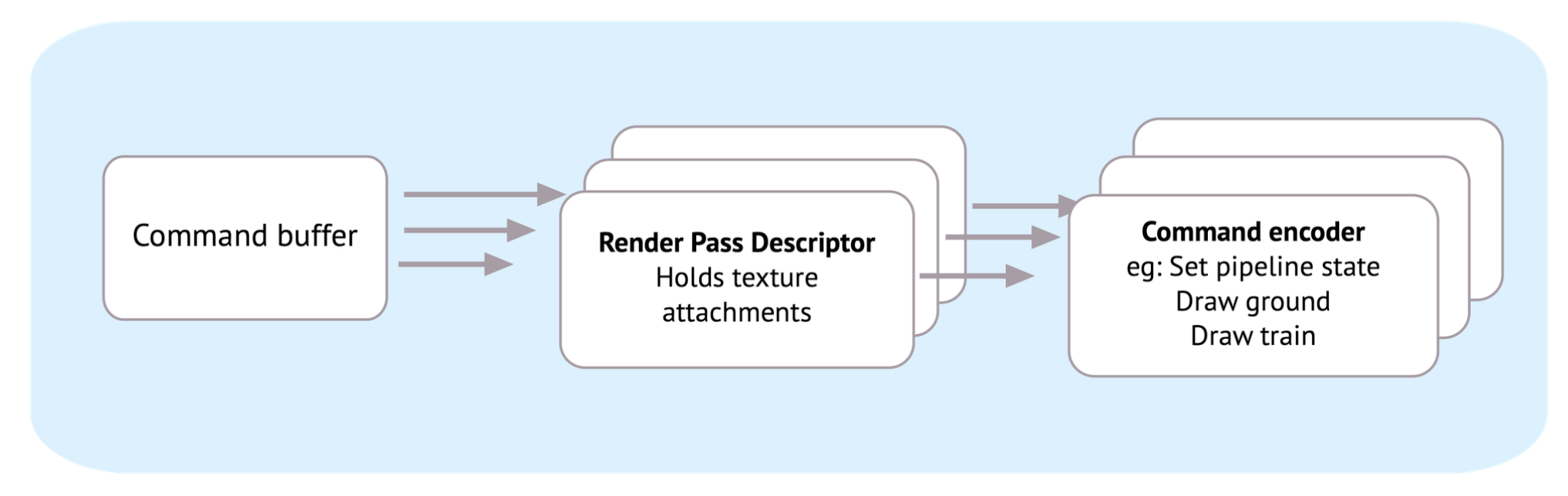
You create a command buffer. This stores all the commands that you’ll ask the GPU to run.
-
You obtain a reference to the view’s render pass descriptor. The descriptor holds data for the render destinations, known as attachments. Each attachment needs information, such as a texture to store to, and whether to keep the texture throughout the render pass. The render pass descriptor is used to create the render command encoder.
-
From the command buffer, you get a render command encoder using the render pass descriptor. The render command encoder holds all the information necessary to send to the GPU so that it can draw the vertices.
Draw:
renderEncoder.drawIndexedPrimitives(
    type: .triangle,
    indexCount: submesh.indexCount,
    indexType: submesh.indexType,
    indexBuffer: submesh.indexBuffer.buffer,
    indexBufferOffset: 0)
Here, you’re instructing the GPU to render a vertex buffer consisting of triangles with the vertices placed in the correct order by the submesh index information. This code does not do the actual render — that doesn’t happen until the GPU has received all the command buffer’s commands.
// 1
renderEncoder.endEncoding()
// 2
guard let drawable = view.currentDrawable else {
fatalError()
}
// 3
commandBuffer.present(drawable)
commandBuffer.commit()
Going through the code:
-
You tell the render encoder that there are no more draw calls and end the render pass.
-
You get the drawable from the MTKView. The MTKView is backed by a Core Animation CAMetalLayer and the layer owns a drawable texture which Metal can read and write to.
-
Ask the command buffer to present the MTKView’s drawable and commit to the GPU.
➤ Finally, add this code to the end of the playground:
PlaygroundPage.current.liveView = view
Summary
• Rendering means to create an image from three-dimensional points.
• A frame is an image that the GPU renders sixty times a second (optimally).
• device is a software abstraction for the hardware GPU.
• A 3D model consists of a vertex mesh with shading materials grouped in submeshes.
• Create a command queue at the start of your app. This action organizes the command buffer and command encoders that you’ll create every frame.
• Shader functions are programs that run on the GPU. You position vertices and color the pixels in these programs.
• The render pipeline state fixes the GPU into a particular state. It can set which shader functions the GPU should run and how vertex layouts are formatted.
Learning computer graphics is difficult. The Metal API is modern, and it takes a lot of pain out of the learning, but you need to know a lot of information up-front. Even if you feel overwhelmed at the moment, continue with the next chapters. Repetition will help with your understanding.